Prompt PsyOps PLR • Built for PLR Buyers, Affiliate Marketers & Digital Product Creators
A Practical AI Topic + PLR License Included
Want to turn a history topic into a book, but worry that AI will lose track of sources or make up details? History Co-Author is a set of planning and writing frameworks for using Claude or ChatGPT to organize research and draft narrative history.
It is designed for history enthusiasts and nonfiction authors who want a guided process and are willing to check the facts and edit the chapters. My review focuses on one question: Does its research and continuity workflow save enough setup work to justify the product’s current price and the review work you still have to do?
An independent buyer inspected the downloaded files, but did not test the system through a completed book. So the available evidence supports what the files contain—not the quality or accuracy of a finished manuscript.
3-Module Core Guide
9 Practical Sections
AI Learn-to-Earn Loop
Action Checkpoints
PLR License Included
Quick Verdict
Yes, if you want a guided process for organizing research and drafting narrative history—and you’re prepared to check and edit the work. Its strongest reason to buy is the ready-made planning and continuity structure. A buyer independently inspected the files and confirmed the setup process and planning documents, but did not test a complete book. That supports what the product contains, not how accurate or polished its finished output will be.
The biggest drawback is that History Co-Author does not remove the need for research judgment or fact-checking. You also need a Claude or ChatGPT account. The exact current product price is unverified; the vendor said the $17 launch price would rise to at least $27, and the AI plan is a separate cost.
Best fit: A history writer with a defined topic who values structure and will review every chapter.
Poor fit: Someone who expects a verified, publish-ready book with little effort.
Current value: It may be worth considering if the live price fits your budget, but confirm the price and terms before judging the deal.
3-Module Core Guide
9 Practical Sections
AI Learn-to-Earn Loop
Action Checkpoints
PLR License Included
The Problem
Writing history takes more than gathering facts. An author has to track sources, dates, people, and events, then shape that research into a clear story without losing accuracy or continuity.
A general AI prompt can produce fluent text, but it may not keep a clear record of where claims came from or how details fit together across chapters. The writer still has to organize the research and check the draft.
Problem
Research notes and sources are scattered
Names, dates, and details may drift across chapters
A basic prompt may produce a summary without a clear source trail
How History Co-Author is designed to help
The Research Bible organizes sources and findings in one project document.
The Book State and Chapter Outline give the AI project references to use as the manuscript develops.
The framework includes research and quotation rules to guide how evidence is recorded and used.
These tools provide structure for the writing process. They do not verify facts or guarantee that every source, quote, or chapter is accurate. An independent buyer confirmed that the downloaded files include these planning elements, but did not test them through a completed book.
That distinction matters: the potential value is a more organized way to work with AI, while the author remains responsible for checking the history.
History Co-Author
History Co-Author is an AI-assisted writing framework for planning and drafting narrative history books. It gives Claude or ChatGPT instructions and project files to help organize research, plan chapters, and maintain continuity as a manuscript develops.
The core package includes three files: a Narrative History Framework, a Style Pack, and a Setup Prompt. The vendor also lists plugins for Claude Cowork and ChatGPT Work, plus training materials. An independent buyer confirmed the three downloaded files and their contents, but did not test the plugins or course.
It fits into the author’s existing AI workflow. The author chooses a topic, supplies or gathers sources, reviews the planning documents, then works through the draft chapter by chapter. The vendor says users need access to Claude or ChatGPT and a paid plan; that requirement and current platform terms should be checked before purchase.
Important clarification: History Co-Author is not a standalone app, historical source database, automatic fact-checker, or direct KDP publishing tool. It provides a structured process. The author remains responsible for checking the evidence and manuscript.
How Is Work
How History Co-Author Works
History Co-Author turns a history topic and its source material into a planned, chapter-by-chapter writing project. The user makes the key choices, reviews the research, and checks the manuscript. The AI follows the framework and helps organize and draft the book.
1. Start with a topic and available research
The user brings a history subject, notes, and any sources they want to use. The files can be added manually to a Claude or ChatGPT project. The vendor also offers Studio plugins for Claude Cowork and ChatGPT Work to handle some file and workflow steps; the independent file reviewer did not test those plugins.
2. Work through the guided setup
The Setup Prompt leads the user through 18 planning steps. The user makes decisions about the book’s focus, scope, story shape, and narrator voice. The AI conducts research at designated points and records the results for the project. The user reviews the options and recommendations rather than accepting them automatically.
3. Review the planning documents
The setup is intended to produce five documents: a Book Bible, Research Bible, People, Places & Entities file, Chapter Outline, and Book State. The user should check that the sources, scope, names, and outline fit the project before drafting begins. The independent file review confirmed that the setup instructions call for these documents.
4. Draft and review one chapter at a time
Before a chapter, the framework prepares a Context Lock with the details and quotations intended for that chapter. The user reviews it, then the AI drafts the chapter using the project materials. The user reads the draft, checks its claims against the sources, and gives notes before moving on.
?
START
Choose a history topic.
1
PLAN
Answer 18 guided setup questions.
2
RESEARCH
Review sources and findings with the AI.
3
OUTLINE
Check the five planning documents.
4
DRAFT
Write and review one chapter at a time.
✓
RESULT
Draft + notes. Fact-check and edit before publishing.
5. Close out and prepare the manuscript: At the end, the workflow is intended to create supporting material such as a cast of characters, notes on names and sources, chapter notes, and a selected bibliography. The user still needs to verify those materials, edit the manuscript, format it, and handle publication. The final output is a draft and supporting documents—not a guarantee of a fact-checked, publication-ready book.
What You Get
What You Actually Get
The buyer-inspected download confirms the core framework files. Other items below are listed by the vendor, but were not independently inspected in that buyer’s review. The live checkout should be checked for current inclusions.
Core Product: Verified in an independent file review
• Narrative History Framework: Guides the AI’s research and writing process.
• Setup Prompt: Leads an 18-step planning process.
• AStyle Pack: Provides style and editing rules.
These are working files for Claude or ChatGPT, not a standalone app.
Planning documents and tools
The Setup Prompt is designed to create five project documents: a Book Bible, Research Bible, People, Places & Entities file, Chapter Outline, and Book State. These are generated during setup; they are not five separate templates in the download. The file review confirms the instructions for generating them.
Training and plugins: Vendor-listed, not independently verified in the inspected download
• A 29-module written course
• Interactive screenshot tutorials and video walkthroughs
• Narrative History Studio plugins for Claude Cowork and ChatGPT Work
The buyer reviewer did not test the plugins or course.
Bonuses, support, and updates
The vendor and affiliates have advertised additional bonuses and updates, but their availability may depend on the offer or purchase link. I could not verify which bonuses are included in the current checkout. Support response times and an ongoing update commitment are also unverified.
Optional Extras
Reported upsells include the History Genre Vault, History Editor, Cover Creator, Promo Stacker, Ghostwriter License, and KDP Club. These are separate offers, not part of the core files. Current prices and availability need checkout confirmation.
Important exclusions
History Co-Author is not a standalone app, a historical database, a guaranteed fact-checker, or a direct KDP publishing tool. You need Claude or ChatGPT access, and the author remains responsible for checking sources, editing the manuscript, and preparing it for publication.
Features
The Features That Actually Matter
A buyer independently inspected the core files. The features below are present in those files; they are not proof that a finished manuscript will be accurate or publication-ready.
Inside the Product
Three Modules. Three Sections Each. One Clear Transformation.
No giant maze of material to work through.
1
Learn What Matters
Help readers narrow a broad topic into the knowledge they actually need for a specific outcome.
✓ Start With the Outcome
✓ Find the Knowledge Gap
✓ Learn in Useful Chunks
2
Learn By Doing
Move beyond polished AI answers and turn learning into actual capability.
✓ Answers vs. Understanding
✓ Explain, Attempt & Test
✓ Correct It & Repeat
3
Turn Learning Into Something Useful
Give the new knowledge a job and connect it to something practical.
✓ Give Learning a Job
✓ Turn Knowledge Into an Asset
✓ Connect It to an Opportunity
And each section is built to make the reader DO something.
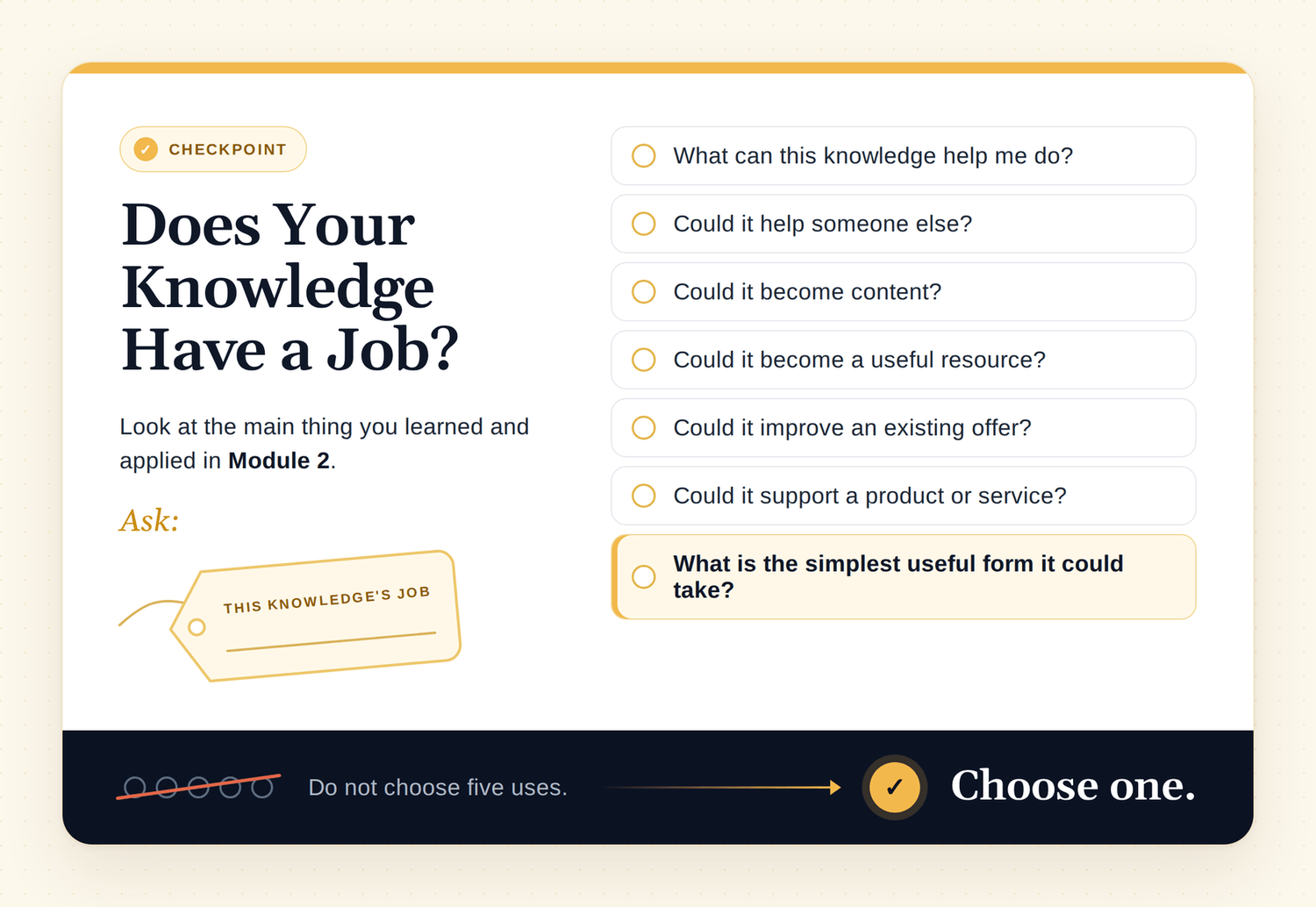
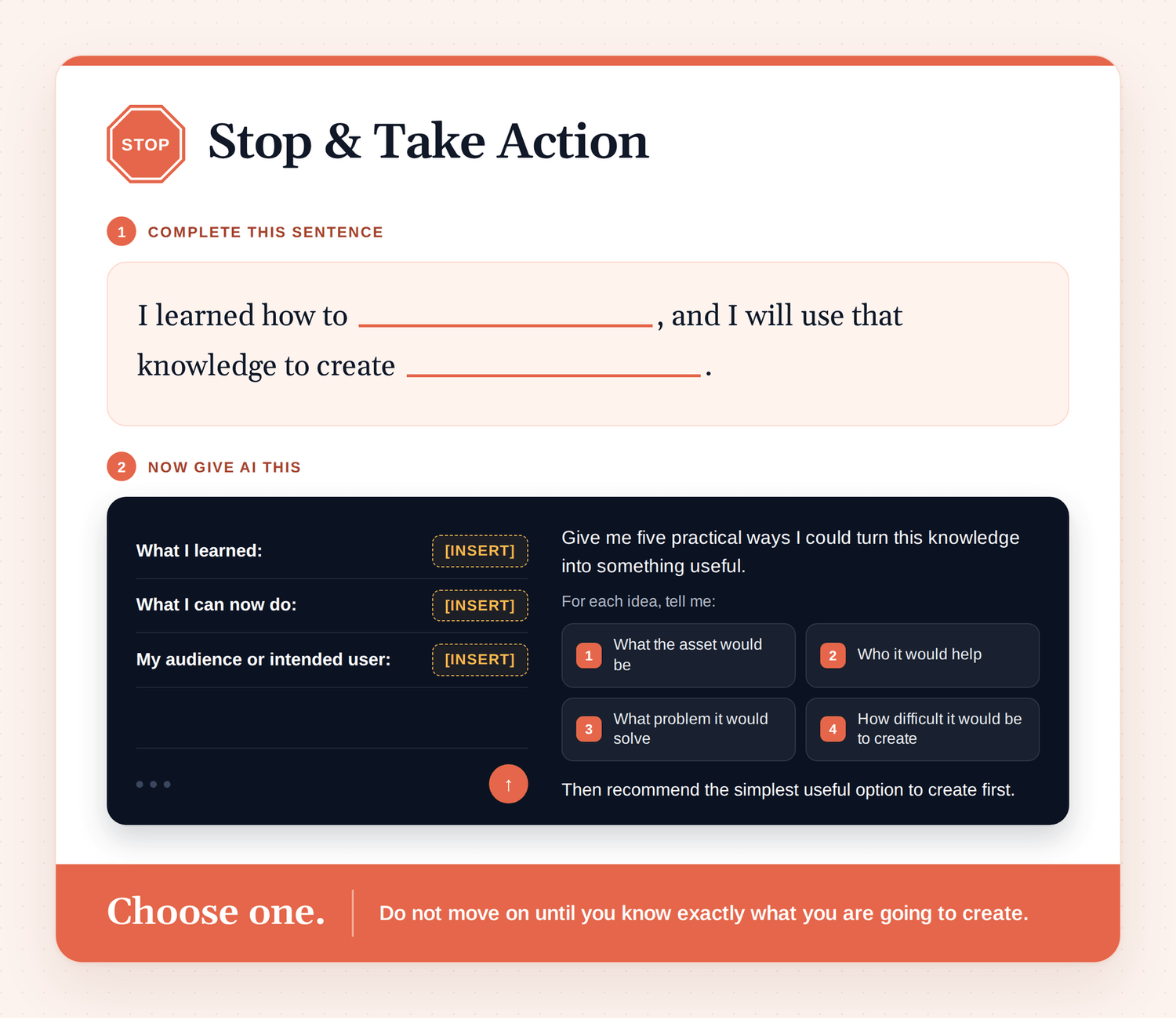
Checkpoints test where they are. Stop & Take Action callouts push them to create, attempt or decide before continuing.
The PLR Business Opportunity
The Real Value of PLR Is What You Can Turn the Content Into
You are not buying information for information's sake.
You are buying a starting asset you can reshape around your market.
Your Own Digital Product
Rebrand the material, adapt the positioning, add your own examples and package it for the audience you serve.
An Affiliate Bonus
Use the training to add practical value around an AI, creator, education, marketing or business offer.
A Lead-Generation Asset
Adapt the framework or part of the content into something useful that attracts the right people into your email list or funnel.
Training for Your Existing Audience
Use it inside a membership, resource library, coaching program, course, workshop or customer area.
Content Ideas
Turn the framework into emails, articles, videos or social content that teaches the concept publicly.
Part of a Larger Offer
Combine the material with your own related products, resources, examples or implementation tools.
Make It Yours
Start With Finished Raw Material Instead of a Blank Screen
The thinking, structure and teaching flow are already there.
Subject to the Included PLR License, You May:
• Rebrand and rename the material
• Edit, rewrite, expand or shorten the content
• Add your own voice, experience, examples and commentary
• Adapt it for a specific niche or audience
• Package it with related products
• Use it as a bonus
• Use it as a lead-generation asset
• Sell the finished product you create
• Keep the profits from your own finished product
The included PLR license governs all use and takes precedence over simplified sales-page examples.
Simple Delivery
Open It. Copy It. Save It. Start Making It Yours.
The core material is delivered in Google Docs so you can get to work without wrestling with complicated delivery systems.
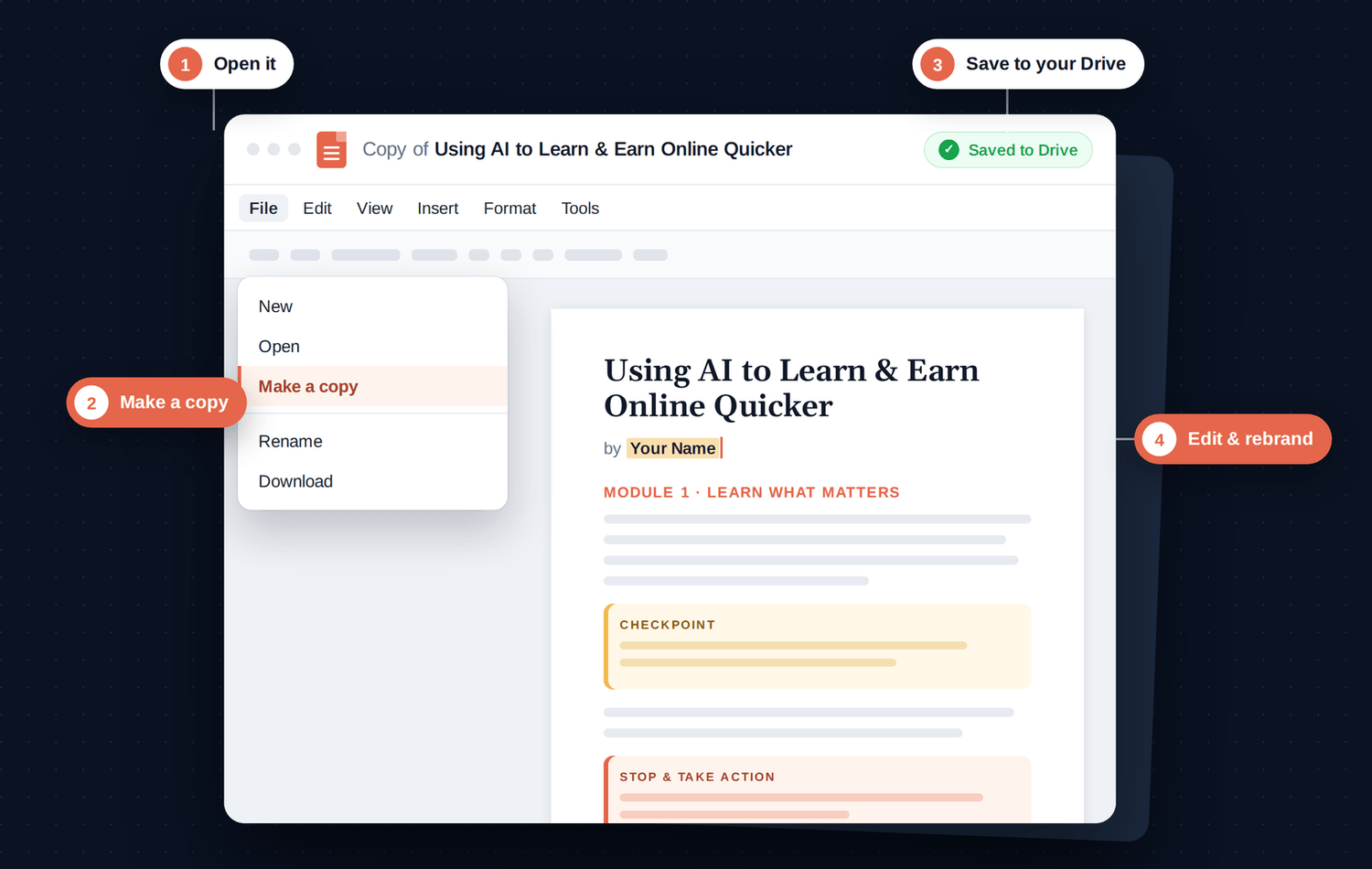
1
Open
Access the material.
2
Make a Copy
Create your own working version.
3
Save to Drive
Keep it under your control.
4
Edit & Rebrand
Build the version you want to use.
Optional Checkout Upgrade
Want to Go From “Here Is the Method” to “Help Me Use the Method”?
The front-end product is complete.
But on the checkout page, you will also have the option to add the AI Learn-to-Earn Project System if you want the same method turned into a ready-to-use AI working system.
Front End
Learn, Teach & Rebrand the Method
You get the complete LEARN → APPLY → CREATE → EARN training and PLR content.
Optional Bump
Give Your AI the Method Too
The AI Learn-to-Earn Project System includes two ways to put the process to work.
Project Mode helps create a reusable AI workspace with the included master instructions and optional Skills where supported.
Quick Action Mode uses a portable Master Meta Prompt you can copy and paste into a capable AI LLM and start using immediately.
The bump does not complete an incomplete product.
The FE teaches the entire method. The optional upgrade simply gives you a faster AI-assisted way to put it into action.

“The point is not to use AI to learn more stuff. The point is to learn what matters, do something with it, and turn what you learn into something useful.”
Garry Lynn Baker
Thirty Minute Marketing & Affiliating
PLR License Included
Start With the Product Already Built — Then Make It Yours
You could start with a blank page and build your own training around learning with AI...
Or you can start with a clear framework, three structured modules, nine practical lessons, action checkpoints, examples and a finished teaching path already in place.
✓ Learn the AI Learn-to-Earn method yourself
✓ Use the framework in your own online business
✓ Teach the concepts to your audience
✓ Edit and rebrand the content
✓ Turn it into your own finished product, bonus, lead asset or training resource
✓ Start with structured raw material instead of a blank screen
That is the opportunity behind PLR.
The idea is already developed. The framework is already organized. The training is already written. Now you decide what you want to turn it into.
Continue to WarriorPlus to complete your purchase. The optional AI Learn-to-Earn Project System may be offered on the checkout page.
FAQ
A Few Things to Know Before You Buy
What exactly am I buying?
You are buying a ready-to-rebrand PLR training product built around the AI Learn-to-Earn Loop. The core guide contains three modules, nine practical sections, checkpoints, Stop & Take Action exercises, and the included PLR license.
Is this useful to me personally, or is it only something to resell?
Both. You can use the material to learn and apply the process in your own business first. Because the product includes a PLR license, you can then edit and repackage the material for your own audience according to those license terms.
Do my customers need advanced AI knowledge?
No. The concept is deliberately beginner-friendly. It starts with a real outcome, identifies what needs to be learned, moves into practical application, and then helps the reader create something useful.
Can I rename and sell the content?
Yes, subject to the included PLR license. You can edit, rebrand and package the material into your own finished product or related asset within those terms.
Do I need the optional checkout bump?
No. The front-end product teaches the complete AI Learn-to-Earn method. The optional AI Learn-to-Earn Project System is an execution upgrade for buyers who want the process configured as an AI-assisted Project or portable meta-prompt system.
Does this promise that AI will make money?
No. The material teaches how useful knowledge can become a useful asset and how that asset may connect to an audience, problem, offer or business goal. AI supports the process. Income and results are never guaranteed.
No Refund Policy: Due to the digital nature of this PLR product and the immediate delivery of downloadable content and usage rights, all sales are final. Please review this page carefully before purchasing and contact support with any pre-sale questions.
Income Disclaimer: This product is provided for educational and informational purposes. No income is guaranteed. Examples of possible product, marketing or business uses are not promises of results. Outcomes depend on your market, experience, skills, offer, implementation, effort and other factors.
Thirty Minute Marketing • Prompt PsyOps